
React Query
서버에서 데이터를 불러오고, 그걸 적절히 캐싱하고, 갱신하고, 상태를 관리하는 라이브러리.
즉, **서버 상태를 다루기 위한 "비동기 상태 관리 도구"**
비동기 상태관리 (Asynchronous State Management)
1. useQuery
fetching(서버에서 데이터를 가져옴) 후 자동으로 데이터를 캐싱하고,
상태를 관리하는 일을 아주 간편하게 만들어주는 훅
- 데이터 인식 (GET) 후 캐싱
- API 호출이 많은 코드에서 중복 코드를 줄여줌
- 이미 불러온 데이터들은 다시 재요청하지 않아도 됨
refetch
: Query의 queryKey가 변할 때마다 새로운 데이터를 자동으로 요청하도록 만듦
2. useMutation
데이터를 생성, 수정, 삭제 할 때 사용하는 서버 변화 작업
- 데이터 변경 (POST, PUT, DELETE)
- 기본적으로 캐시 안 되므로 수동으로 invalidate 해줘야 함
- 비동기 통신 대신 useMutation 사용하기
3. 동작 함수
queryFn / mutationFn
useQuery나 useMutation이 실행할 비동기 함수(API 요청 함수)
- 데이터 조회 (GET)
- 자동 캐싱 + 리페치
- fetch/axios 함수 구성
key, word값이 변하면 자동으로 데이터를 가져옴
  const {
    data: books = [],  // data 캐싱
    isLoading,
    error,
  } = useQuery<Book[]>({
    queryKey: ["books", queryKeyState],
    queryFn: () => searchAllBooks({ key: queryKeyState.key, word: queryKeyState.word, pageNo: 1 }),
  });
4. QueryClient
모든 쿼리(useQuery, useMutation)를 관리하는 중앙 관리자
- 전역 상태 관리
- 쿼리 결과 캐싱
- 쿼리 재요청 트리거
- 개발자 도구 상태 공유
- 쿼리 무효화(invalidate): 캐시 조작하기
invalidateQueries(["books"])
  [ 컴포넌트 A ] ← useQuery ┐
  [ 컴포넌트 B ] ← useQuery ┘
           ⬇
       ┌───────────┐
       │ QueryClient│  ← 모든 쿼리 캐시, 상태 저장소
       └───────────┘
               ↑
   쿼리 무효화 / 초기화 / 갱신
"use client";
import { QueryClient, QueryClientProvider } from "@tanstack/react-query";
import { ReactNode, useState } from "react";
export default function QueryProvider({ children }: { children: ReactNode }) {
const [queryClient] = useState(() => new QueryClient());
return <QueryClientProvider client={queryClient}>{children}</QueryClientProvider>;
}
- 수정 삭제 후 갱신 요청]
const deleteMutation = useMutation({
mutationFn: removeBook,
onSuccess: () => {
alert("성공");
//목록 갱신
queryClient.invalidateQueries({queryKey: ["books"]}) //삭제한 후 갱신할 대상: books
router.push("/books");
},
});
5. Context API
리엑트 프로젝트에서 전역적으로 사용할 데이터가 있을 때 이를 사용하여 전역 상태를 관리함
- 여기저기에서 사용되는 상태가 있고, 컴포넌트의 갯수가 많다면 contextApi 사용하기
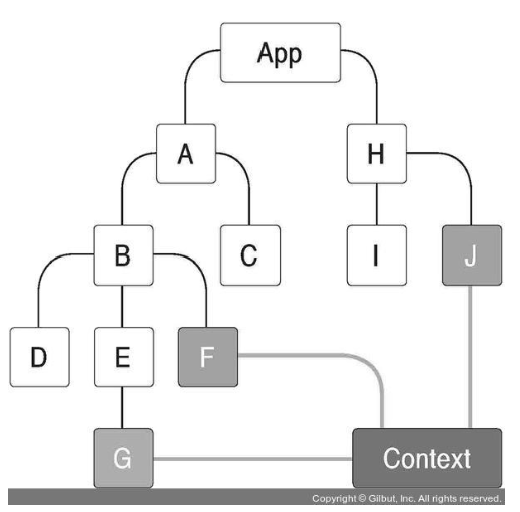
1. Render Props (Function as a child)
컴포넌트의 children이 있을 자리에 JSX 혹은 문자열이 아닌 함수를 전달
import React from 'react';

const RenderPropsSample = ({ children }) => {
  return <div>결과: {children(5)}</div>;
};

export default RenderPropsSample;
2. Provider
Context의 value 변경 가능
- value값을 명시해 주어야 제대로 작동함
import React from 'react';
import ColorBox from './components/ColorBox';
import ColorContext from './contexts/color';
const App = () => {
  return (
    <ColorContext.Provider value={{ color: 'red' }}>
      <div>
        <ColorBox />
      </div>
    </ColorContext.Provider>
  );
};

export default App;
3. ContextType
클래스 메서드에서도 Context에 넣어둔 함수를 호출할 수 있음
- 허나 한 클래스에서 하나의 Context밖에 사용하지 못 함
- 된다면 useContext 사용하기
import React, { Component } from 'react';
import ColorContext from '../contexts/color';

const colors = ['red', 'orange', 'yellow', 'green', 'blue', 'indigo', 'violet'];

class SelectColors extends Component {
  static contextType = ColorContext;

  handleSetColor = color => {
    this.context.actions.setColor(color);
  };

  handleSetSubcolor = subcolor => {
    this.context.actions.setSubcolor(subcolor);
  };

  render() {
    return (
      <div>
        <h2>색상을 선택하세요.</h2>
        <div style={{ display: 'flex' }}>
          {colors.map(color => (
            <div
              key={color}
              style={{
                background: color,
                width: '24px',
                height: '24px',
                cursor: 'pointer'
              }}
              onClick={() => this.handleSetColor(color)}
              onContextMenu={e => {
                e.preventDefault();
                this.handleSetSubcolor(color);
              }}
            />
          ))}
        </div>
        <hr />
      </div>
    );
  }
}

export default SelectColors;'FrontEnd > React' 카테고리의 다른 글
| [ React ] RTK ( Redux Toolkit ) (1) | 2025.04.23 |
|---|---|
| [ React ] 자주 사용하는 코드 구성 요소 5가지_객체, 속성, 속성값, 인자, 매개변수 (4) | 2025.04.22 |
| [ TypeScript ] 기초 (2) | 2025.04.11 |
| [ React ] TODO LIST 만들기 (3) | 2025.04.09 |
| [ React ] 컴포넌트 스타일링 (0) | 2025.04.08 |