1. 404 ErrorPage 구현

import { useSearchParams } from "react-router-dom";

export default function NotFoundPage() {
  const [searchParams] = useSearchParams();

  // URL 쿼리 파라미터에서 에러 메시지 추출
  const message = searchParams.get("message");

  // 메시지가 있으면 디코딩, 없으면 기본 메시지 사용
  const errorMessage = message
    ? decodeHTMLEntities(message)
    : "페이지를 찾을 수 없어요...😢";

  // HTML 엔티티 디코딩 함수
  function decodeHTMLEntities(text: string) {
    const textarea = document.createElement("textarea");
    textarea.innerHTML = text;
    return textarea.value;
  }

  return (
    <div className="flex flex-col justify-center items-center min-h-screen bg-gradient-to-b from-[#f7d9aa] to-[#a8c0ff] text-center px-6 relative overflow-hidden">
      <div className="z-10">
        <h1 className="text-[6rem] font-extrabold text-[#3b82f6] drop-shadow-md">
          404
        </h1>
        <p className="text-xl text-gray-800 mb-4">{errorMessage}</p>
        <p className="text-base text-gray-700 mb-6">
          입력한 주소를 다시 확인해 주세요.
        </p>

        <button
          onClick={() => (window.location.href = "/")}
          className="mt-4 px-6 py-2 bg-[#9DEEFB] hover:bg-[#3BDDF7] text-blue-900 font-semibold rounded-full shadow-md transition-all"
        >
          홈으로 돌아가기
        </button>
      </div>
    </div>
  );
}
2. 500 ErrorPage 구현
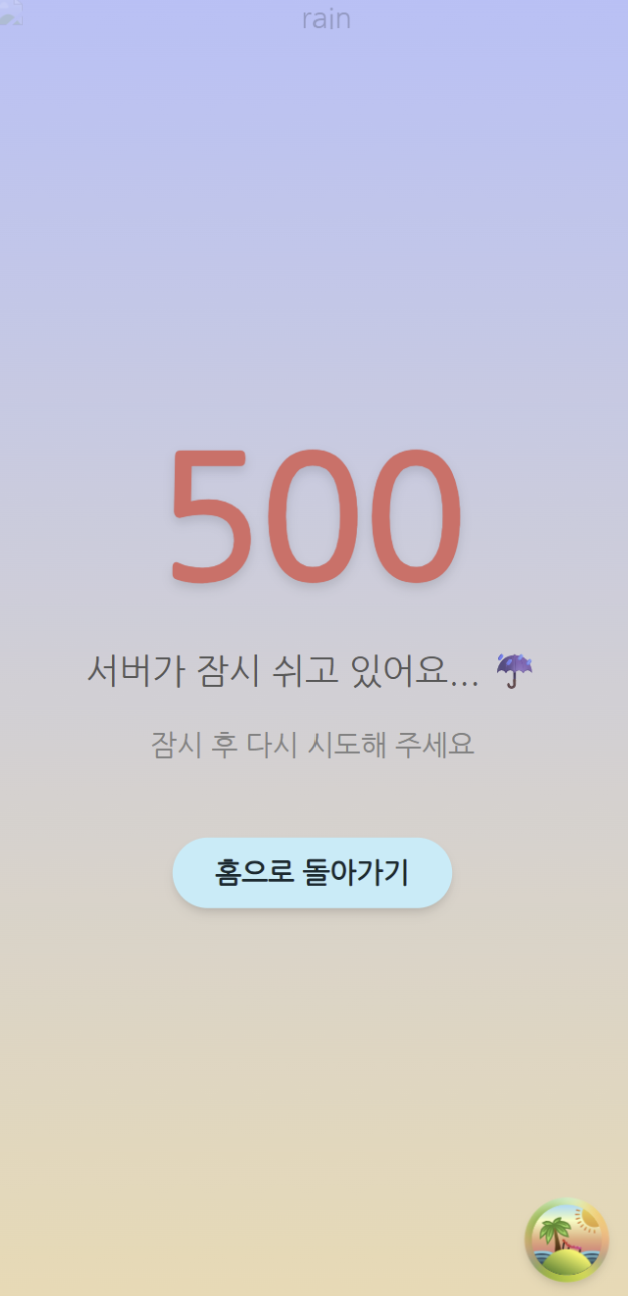
import { useSearchParams } from "react-router-dom";

export default function ErrorPage() {
  const [searchParams] = useSearchParams();

  // URL 쿼리 파라미터에서 에러 정보 추출
  const status = searchParams.get("status") || "500";
  const message = searchParams.get("message") || "서버가 잠시 쉬고 있어요...☔";

  // HTML 디코딩 (인코딩된 문자열 처리)
  const decodedMessage = decodeHTMLEntities(message);

  // HTML 엔티티 디코딩 함수
  function decodeHTMLEntities(text: string) {
    const textarea = document.createElement("textarea");
    textarea.innerHTML = text;
    return textarea.value;
  }

  return (
    <div className="flex flex-col justify-center items-center min-h-screen bg-gradient-to-b from-[#a8c0ff] to-[#f7d9aa] text-center px-6 relative overflow-hidden">
      <div className="z-10">
        <h1 className="text-[6rem] font-extrabold text-[#ff5f5f] drop-shadow-md">
          {status}
        </h1>
        <p className="text-xl text-gray-800 mb-4">{decodedMessage}</p>
        <p className="text-base text-gray-700 mb-6">
          잠시 후 다시 시도해 주세요.
        </p>

        <button
          onClick={() => (window.location.href = "/")}
          className="mt-4 px-6 py-2 bg-[#9DEEFB] hover:bg-[#3BDDF7] text-blue-900 font-semibold rounded-full shadow-md transition-all"
        >
          홈으로 돌아가기
        </button>
      </div>
    </div>
  );
}
3. LoadingSpinner 구현

interface LoadingSpinnerProps {
  /**
   * hex값 string 또는 color string(red, blue, ...)
   */
  color?: string;
  /**
   * 가로 세로 크기 (px)
   */
  size?: number;
}

export function LoadingSpinner({ color = "#3BDDF7", size = 50 }: LoadingSpinnerProps) {
  return (
    <div
      role="progressbar"
      className="rounded-full border-4 border-gray-300 border-t-solid animate-spin"
      style={{
        width: size,
        height: size,
        borderTopColor: color,
      }}
    />
  );
}
import { LoadingSpinner } from "@/components/common/LoadingSpinner";

export const LoadingPage = () => {
  return (
    <div className="flex items-center justify-center h-screen">
      <LoadingSpinner />
    </div>
  );
};